NEWNEXUS MOBILE

Telegram signals executed.
No PC left on.

We run your MetaTrader 5 terminal for you, 24/5, on our servers — and you manage everything from the Nexus Copier app on your phone. No computer to leave on, no Windows, no VPS to administer.

Requires a Nexus Copier licence · MetaTrader 5 only · Android app · €14.90/month in the EU, US$16.90/month elsewhere · cancel any time.

Nexus Copier app: NEXUS MOBILE

HOW IT WORKS

Up and running in three steps

1

Get your Nexus Copier licence

Nexus Mobile is for Nexus Copier customers: your licence is what runs on your hosted terminal. Already have one? Skip to step 2.

2

Install the app and subscribe

Download Nexus Copier from Google Play, sign in with the email of your purchase and subscribe to Nexus Mobile.

3

Add your MT5 account and your channels

Enter your broker login, connect your Telegram channels and choose your risk rules. We start your terminal and it trades from then on.

WHY NEXUS MOBILE

Everything runs for you. You stay in control.

🖥️

Your own MT5 terminal, always on

We run MetaTrader 5 for you on our servers, connected 24/5 during market hours. Nothing to install, nothing to keep awake, no Windows machine to look after.

MetaTrader 5 only. For MT4 or cTrader, use Nexus Cloud/Local or the Managed VPS.

📱

The whole operation, from your phone

Signals, open trades, risk limits, break-even, take-profit rules, channel settings, pause and panic buttons, push alerts when something needs you. Change a rule at the bus stop; it applies to your terminal.

👀

Your account, visible anywhere

Your trades live on your broker account, so if you open MT5 on your PC (or your broker's app) with the same login, you see the same positions running.

Do not run the Nexus EA on your PC at the same time: it would copy every signal twice.

🛡️

Risk controls that work while you sleep

Daily-loss and drawdown limits, trade-count limits, trading hours and break-even — the same Nexus engine used by Cloud, applied to a terminal that never goes offline.

THE APP

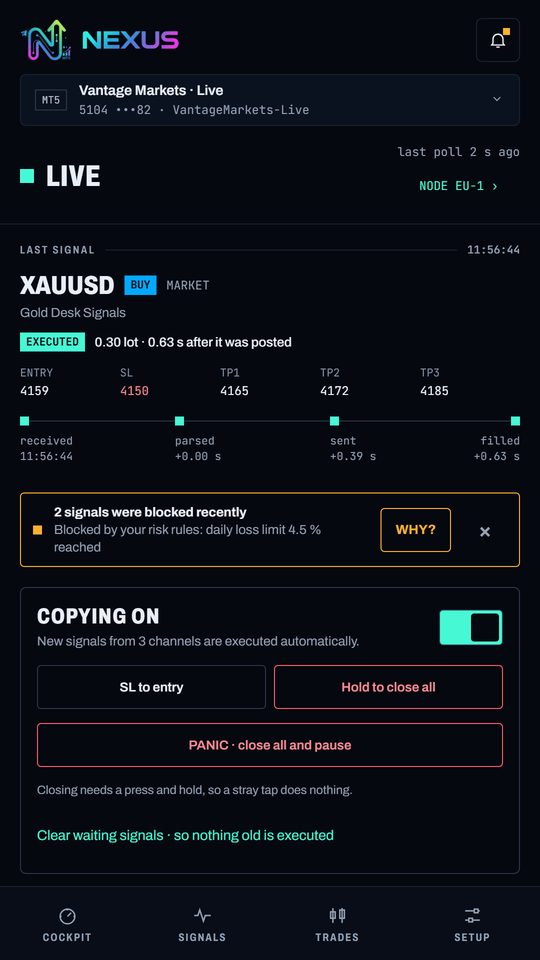
Built for the phone, not shrunk from a desktop

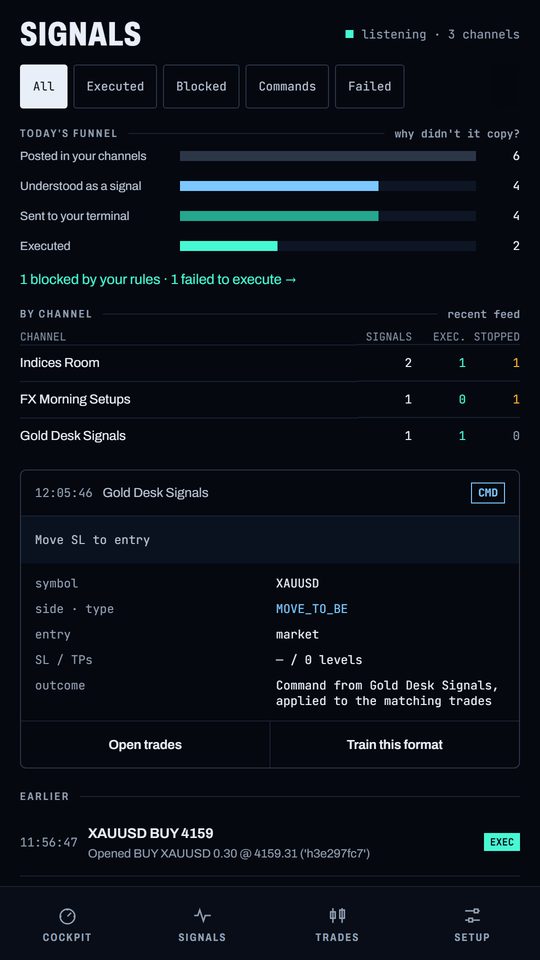
Nexus Copier app: Every signal, as it arrives
Every signal, as it arrives
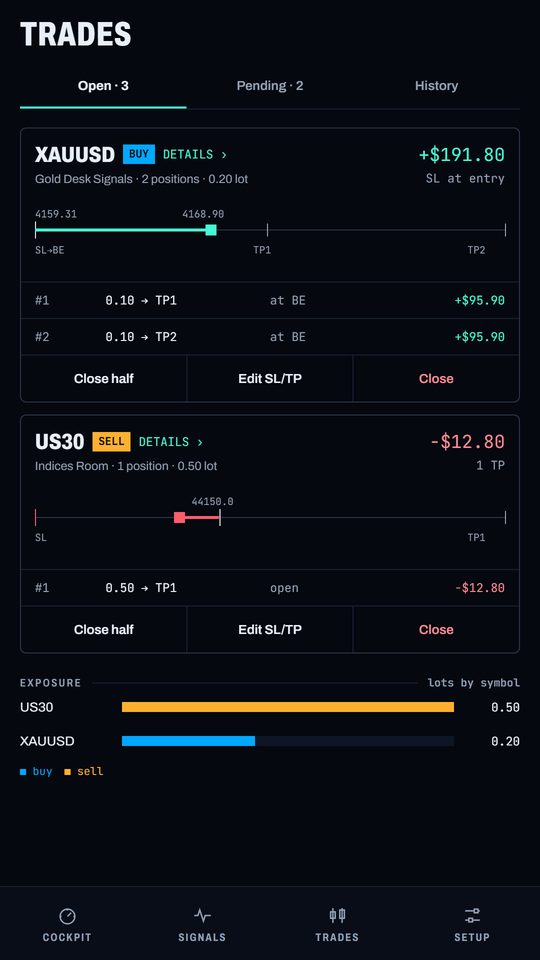
Nexus Copier app: Open trades and history
Open trades and history
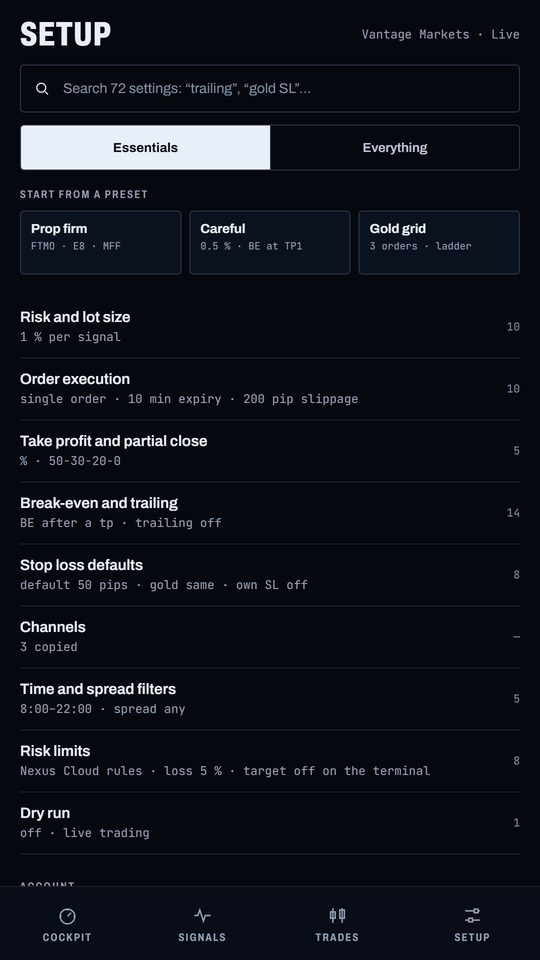
Nexus Copier app: Your terminal and your rules
Your terminal and your rules
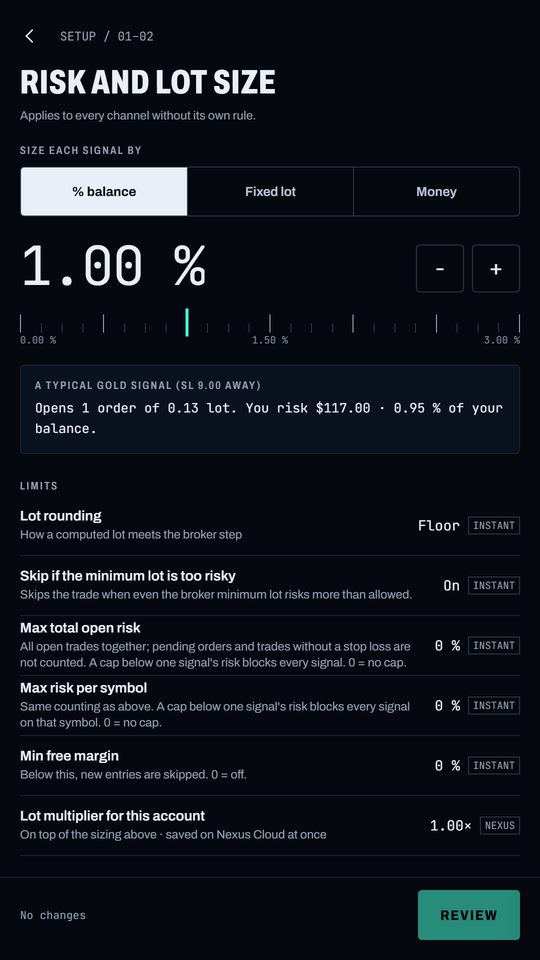
Nexus Copier app: Risk limits in a few taps
Risk limits in a few taps

CHOOSE YOUR SETUP

Nexus Mobile or the Managed VPS?

We now have two hosted options. They solve different problems: the Managed VPS is a full Windows computer in the cloud, as if it were your own PC. Nexus Mobile is a managed MetaTrader 5 terminal that you control only through the app.

Nexus MobileManaged VPS (Windows)
What it isA managed MetaTrader 5 terminal, run by usA Windows computer in the cloud, like your own PC
How you use itOnly through the Nexus Copier appRemote desktop: you install and run what you need
PlatformsMetaTrader 5Whatever you would run on a Windows PC
SetupSelf-service, in minutesWe build it for you after you send your details
MaintenanceNone — we manage the terminalYours, like a PC (we provide the machine)
Other tools or EAsNo: the Nexus EA onlyYes: it is your own Windows environment
Price€14.90/month (EU) · US$16.90/monthUS$29/month (1 terminal) · US$49/month (up to 3)

Choose Nexus Mobile if…

  • You trade on MetaTrader 5 and want it hands-off
  • You want to run everything from your phone
  • You do not want to learn or maintain a server

Choose the Managed VPS if…

  • You use MT4 or cTrader
  • You want to run other EAs, tools or indicators
  • You prefer a full Windows desktop you can log in to

SECURITY

Your broker password stays yours

Your password is stored encrypted, is never shown again, and is removed from the terminal's disk once it has logged in. Every terminal runs isolated from all the others. Deleting your account stops your terminal and erases your credentials; open trades stay at your broker with their stop loss and take profit.

COMPATIBILITY

Does it work with my broker?

Nexus Mobile runs the global MetaTrader 5 terminal and needs to know your broker's server. We keep growing the catalogue of brokers and prop firms, and you can check yours live below.

  • How we check: we try the server from our own terminal. If it answers, Nexus Mobile can connect to it
  • Not on the list? Tell us and we will add it
  • Prop firms: each firm sets its own rules on copiers and hosted terminals, and your terminal runs from our servers. Check your firm's rules and ask us before you subscribe.

Check your broker server

You will find it in MetaTrader 5 under File → Login to Trade Account → Server, or in the email from your broker. Type it exactly as shown.

Does your broker appear as not supported? Write to Support telling us which one it is and we will add it.

FAQ

Questions, answered

Do I need a Nexus Copier licence?

Yes. Nexus Mobile is an add-on for Nexus Copier customers: the app signs in with the email of your purchase and your licence is what runs on the terminal.

Does it work on iPhone?

Not yet. The app is available for Android on Google Play.

Can I use MT4 or cTrader?

No. Nexus Mobile runs MetaTrader 5 only. For MT4 and cTrader, use Nexus Cloud, Nexus Local or the Managed VPS.

Can I still trade manually or watch my trades on my PC?

Yes. Your trades are on your broker account, so any MT5 terminal or broker app logged into that account shows them. Manual trades are yours: Nexus only manages the trades it opened. Do not run the Nexus EA on your PC at the same time as Nexus Mobile.

What happens if I cancel?

Your terminal is stopped. Trades that are open stay at your broker with their stop loss and take profit, but Nexus no longer manages them, so close or review them before you cancel.

How many accounts can I connect?

Up to two MetaTrader 5 accounts per subscription. If you need more, contact us.

Where do I pay?

In the Nexus Copier app through Google Play, or here on the website. Either way, one subscription gives you the same service.

Stop babysitting a computer.

Get your licence, install the app and let your signals trade while you get on with your day.

Trading leveraged products carries a high level of risk and may not be suitable for everyone. Nexus Copier is an execution tool and does not provide investment advice. Past results of any signal do not guarantee future results.